
How to Register on Binance Safely: A Beginner's Checklist
A website registration guide for eligible beginners: prepare your own email or phone, check referral details, complete verification, and secure your account.

To register a personal Binance account, first check whether the service is available to you, then create the account using contact details you control. Complete the identity checks required for your account and secure your login before considering a deposit. This guide covers the website's email or phone route for adult beginners; available methods and screens can differ by location.
Before you start: check eligibility and prepare your details
Open the official Binance Terms of Use and read the terms presented for your location. Check the service provider, minimum age, residence restrictions, and any product-specific conditions. This address can lead to different regional terms, so there is no single document version identified here as applicable to every reader. Being able to open the website does not establish that you can use its services.
Prepare your own email address or phone number, access to that inbox or device, and a private device on which to register. Use accurate personal information. Do not buy an existing account, borrow someone else's identity, or accept an offer to complete verification through an unofficial intermediary.
If the service does not support your location or circumstances, stop. A referral offer does not change eligibility.
Create the account with your own email or phone number
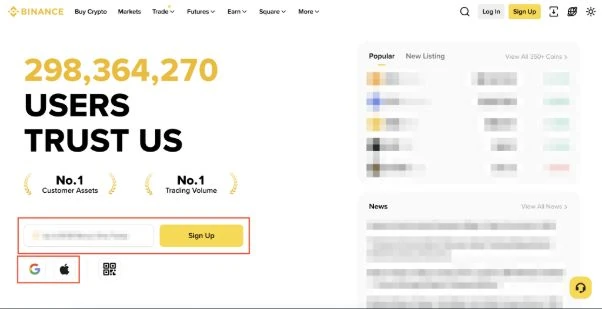
Source: Binance's registration tutorial. This is an illustration from its help page, not a recording of the author's account. Other text and figures in the image are part of that source; follow the current interface for your location.
The current official tutorial describes this sequence:
- Open the official Binance website. Enter your own email address or phone number, then choose Sign Up. Use the personal-account route if you are registering for yourself.
- Check the contact detail carried into the next screen. Read the terms and privacy notice shown before agreeing and continuing.
- Retrieve the verification code from that inbox or phone. Enter it only in the registration flow you opened.
- Set a unique password that meets the on-screen requirements.
- Review any referral code and the relationship it creates before completing registration. Do not assume the invitation includes a rebate.
If the interface differs, consult the official instructions. They also explain other signup methods.
Check referral information before finishing
A code marked as linked is different from an empty referral field. Binance states that an established referral relationship cannot be changed or removed. Its Referral Pro FAQ separately describes a later binding option for some eligible accounts with no existing referral relationship. That option has several conditions; do not rely on being able to add or replace a code afterward.
Read how fees and referral rebates differ before accepting an invitation. A percentage earned by the inviter is not automatically a percentage returned to you.
Complete the required identity checks
On the website, the official route is Account → Identification, or Get Verified where offered. Select your actual residence, document-issuing country, and an accepted document type. Follow the upload and liveness instructions. Review personal details carefully before confirming them.
The personal verification guide says new users must complete the required verification to access services including crypto deposits and trading. Document options and submission methods vary. Creating a login is not the same as passing verification, and this guide cannot establish whether your application will be accepted.
Submit identity documents only through the official verification flow. Coivio does not need your documents or account details to explain the process.
Secure the account before a deposit
Open the account security settings and enable an available additional authentication method. Protect any recovery information and secure the linked email account too. Review authorized devices and remove entries you do not recognize. The official account security guide explains these controls.
Before moving funds, answer these questions:
- Am I eligible for the service and product I intend to use?
- Can I access and recover my login without another person's help?
- Has the required verification completed?
- Do I understand the receiving asset, network, minimum amount, and fees?
If any answer is unclear, resolve it before sending money. The beginner safety checklist explains the transfer checks. Registration does not require you to place a trade.
Sources and editorial note
Official public guidance reviewed on 17 September 2026. This article is a source-based explanation, not a claim that every regional signup flow was personally tested. Follow the live instructions and terms applicable to your account.
- Binance Terms of Use
- Website registration tutorial
- Personal identity verification
- Account security guide
- Referral Pro FAQ
Coivio is an independent personal publication and is not affiliated with or endorsed by Binance. This article contains no referral invitation. For corrections, email coivio@coivio.com; never include passwords, verification codes, identity documents, or recovery keys. Educational information, not individualized financial advice.